
Affiliate Disclosure: As an Amazon Associate I earn from qualifying purchases. Amazon and the Amazon logo are trademarks of Amazon.com, Inc.
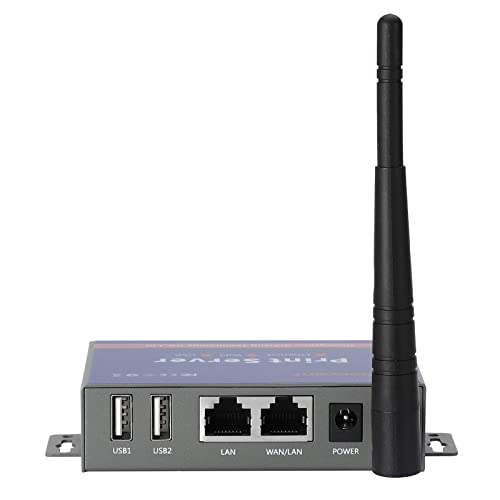
CHEECENT Wireless Print Server for USB Printer CR202: A Comprehensive Review
In today's digital age, wireless printing has become a necessity. The CHEECENT Wireless Print Server CR202 aims to convert your existing wired USB printer into a wireless, network-accessible device. This can be a game-changer for homes or small offices looking to eliminate cable clutter and share printer access among multiple users. However, unlike some plug-and-play solutions, this device requires a bit more setup. This review will delve into the features, performance, and overall value of the CHEECENT CR202, helping you decide if it's the right fit for your printing needs.
The CHEECENT CR202 Wireless Print Server bridges the gap between older, wired printers and modern wireless networks. This allows users to print from any device connected to the Wi-Fi network, eliminating the need for a direct USB connection to a computer. This is particularly useful for those who frequently print from laptops, tablets, or smartphones and don't want to be tied to a specific location.
Key Features of the CHEECENT CR202
Here's a rundown of the key features and specifications:
- • Wireless Connectivity: Supports 802.11 b/g/n Wi-Fi standards for seamless wireless printing.
- • Dual USB 2.0 Ports: Allows connecting two USB printers simultaneously, maximizing printer sharing capabilities.
- • Ethernet Port: Includes a 10/100Mbps Ethernet port for wired network connectivity.
- • Wide Compatibility: Compatible with Windows, Mac, and Linux operating systems.
- • Compact Design: Small and lightweight design for easy placement in any environment.
Pros: Advantages of the CHEECENT CR202
- • Affordable Wireless Printing: Significantly cheaper than purchasing a new wireless printer, offering a cost-effective solution for older printers.
- • Supports Multiple Printers: With two USB ports, users can connect and share two printers simultaneously, enhancing productivity.
- • Wide Operating System Compatibility: Compatible with a broad range of operating systems, including Windows, Mac, and Linux, ensuring versatility and ease of integration.
- • Stable Connection (Wired): The ethernet port provides a more stable network connection compared to relying solely on Wi-Fi, which is useful in environments with unreliable wireless signals.
- • Relatively Easy Setup (Once Understood): While not plug-and-play, the setup process is straightforward once the documentation is followed carefully.
Cons: Disadvantages of the CHEECENT CR202
- • Not Plug-and-Play: Requires manual configuration and driver installation, which might be challenging for less tech-savvy users. This contrasts with truly plug-and-play wireless print servers from brands like TP-Link or D-Link which offer more user-friendly setup experiences.
- • Limited Security Features: Compared to higher-end print servers, the security features may be limited, potentially posing a risk in sensitive environments. Consider dedicated security solutions for networked devices.
Who Should Buy the CHEECENT CR202?
The CHEECENT Wireless Print Server CR202 is ideal for:
- • Home users: Who want to share a printer among multiple devices in their home network without the hassle of cables. It's a budget-friendly alternative to buying a new wireless printer.
- • Small office/home office (SOHO) environments: Where multiple users need access to a printer, but budget constraints are a concern. The dual USB ports make it suitable for handling moderate printing demands.
- • Individuals with older USB printers: Who want to extend the life of their existing printer and add wireless capabilities without a significant investment.
Conclusion: Is the CHEECENT CR202 Worth It?
The CHEECENT Wireless Print Server CR202 offers a cost-effective solution for converting a wired USB printer into a wireless network printer. While it requires some initial setup, the affordable price and dual USB port functionality make it a worthwhile option for home and small office users. It's a good value if you are on a tight budget and willing to spend some time with the configuration.
Ultimately, the CHEECENT CR202 provides a solid performance for the price. Buy it now and breathe new wireless life into your old printer!
Frequently Asked Questions (FAQ)
Q: Is the CHEECENT CR202 compatible with all printers?A: While it supports a wide range of USB printers, it's recommended to check the CHEECENT website or product documentation for a compatibility list. Compatibility issues can arise with very old or highly specialized printers.
Q: How difficult is the setup process?A: The setup process involves installing drivers and configuring network settings, which may be challenging for beginners. However, the included instructions are generally clear, and online resources are available for assistance.
Q: Can I print from my smartphone or tablet using this print server?A: Yes, as long as your printer is compatible and properly configured with the print server, you can print from any device connected to your Wi-Fi network, including smartphones and tablets.
Q: What security protocols does the CHEECENT CR202 support?A: While the specific security protocols may vary, it's important to ensure that your Wi-Fi network is protected with a strong password and encryption (WPA2 or WPA3) to prevent unauthorized access.
Q: How does this compare to a built-in printer server?A: Many newer printers come with integrated wireless and print server functionalities. This is generally the easiest approach if you require wireless printing. However, the CHEECENT allows you to retrofit older USB printers without the cost of a replacement.
Q: Where can I find the latest drivers and software?A: Visit the CHEECENT website and search for the CR202 model to download the necessary drivers and software for your operating system.
Advantages
Affordable wireless printing solution for older USB printers
Supports connecting and sharing two printers simultaneously
Compatible with Windows, Mac, and Linux operating systems
Stable wired connection via ethernet port (alternative to Wifi)
Provides functionality comparable to more expensive solutions
Limitations
Not a plug-and-play device; requires manual configuration and driver installation
Limited security features compared to high-end print servers
Expert Verdict
The CHEECENT CR202 Wireless Print Server provides an affordable way to convert older USB printers to wireless, but the slightly involved setup may not be ideal for tech novices. For users comfortable with basic network configurations and seeking a budget-friendly solution, this print server provides a good value.
User Reviews
2 reviews
Total Reviews
From verified buyers
They do the job. The metal is thick but the paint was chipped in one spot when it arrived. Height adjustment is a bit of a workout if you have a lot of weight on the table. It's okay, nothing fancy.
I was worried it wouldnt fit my generator but the 1/4 inch ID is spot on. Much cheaper than buying it by the foot at the local hardware store and now I have plenty of extra left over for next time!
Write a Review
Thank You for Your Review!
Your review has been submitted and is pending moderation. It will be published after our team reviews it.